
Solidity: Storage Slots of Complex Types
Dynamic-sized types in Solidity are data types with variable size.
mappingsnested mappingsarraysnested arraysstringsbytesstructsthat contain any of those types.
Mappings
Mappings are used to store data in the form of key-value pairs.
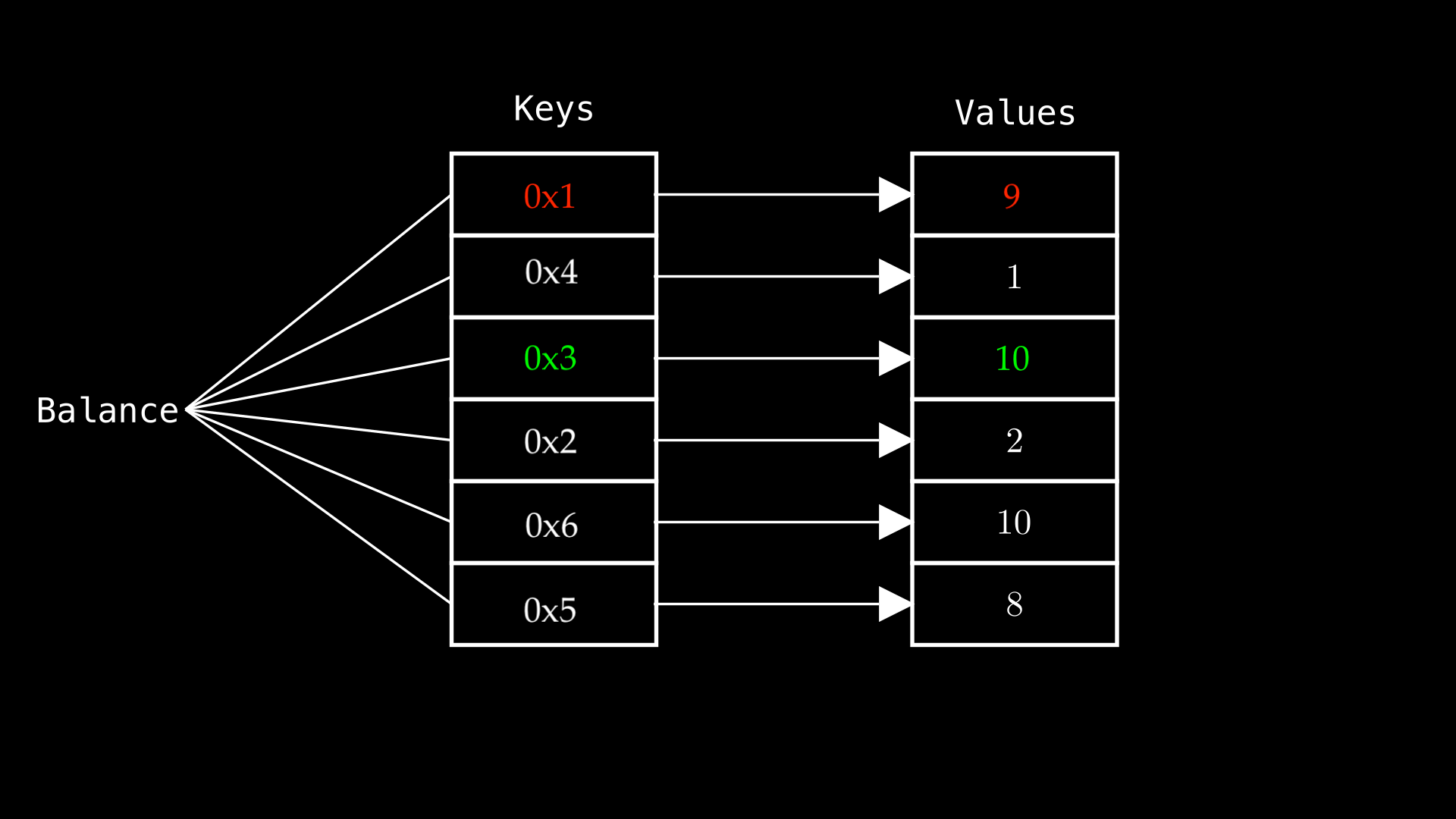
contract Contract {
  mapping(address => uint256) public balances;

  function setBalance(address _address, uint256 _value) public {
    balances[_address] = _value;
  }
}
To compute the storage slot of the value by followings steps:
- Identify the key → The user's address acts as the key.
- Convert the key → Pad the address to 32 bytes.
- Get the mapping's base slot → The mapping starts at slot 0.
- Concatenate key & base slot → Combine them into a 64-byte value.
- Hash the result → Use
keccak256to compute the final storage slot.
Visualize:
- address key =
0x504DbB5Dc821445b142312b74693d778a1B60b2f - uint256 baseSlot =
0
 COMPUTE MAPPING STORAGE SLOT
Formula for the above steps by js
import {
  BigNumberish,
  Signer,
  concat,
  keccak256,
  toBigInt,
  zeroPadValue,
  toBeHex,
} from "ethers";
import { ethers } from "hardhat";

it("--- STORAGE LAYOUT FOR MAPPING ---", async () => {
  const [user] = await ethers.getSigners();
  const Contract = await ethers.getContractFactory("Contract");
  const contract = await Contract.deploy();
  const contractAddress = await contract.getAddress();

  // Set mapping value
  const valueToSet = 123;
  const userAddress = await user.getAddress();
  await contract.setBalance(userAddress, valueToSet);

  // The mapping balances is at slot 0
  const mappingSlot = 0;

  // COMPUTE STORAGE SLOT OF BALANCES[USER.ADDRESS]
  // zeroPadValue (address/uint) => hex string 32 bytes
  const key = zeroPadValue(userAddress, 32);
  const slot = zeroPadValue(toBeHex(mappingSlot), 32);
  const storageSlot = keccak256(concat([key, slot]));

  // read raw storage value
  const rawValue = await ethers.provider.getStorage(
    contractAddress,
    storageSlot
  );

  const storedValue = toBigInt(rawValue);
  expect(storedValue).to.equal(valueToSet);

  console.log("Storage slot:", storageSlot);
  console.log("Stored value:", storedValue.toString());
});
Now that we have an idea of how key and base slot are computed to get the storage slot for a mapping, we are ready to see how it's done manually in Solidity.
contract StorageLayout {
  mapping(address => uint256) public balances;

  function setBalance(address _address, uint256 _value) public {
    balances[_address] = _value;
  }

  function getStorageSlot(address _key)
     public pure returns (bytes32 slot)
  {
    uint256 balanceMappingSlot;

    assembly {
      // `.slot` returns the state variable (balance)
      // location within the storage slots.
      // In our case, balance.slot = 0
      balanceMappingSlot := balances.slot
    }

    slot = keccak256(abi.encode(_key, balanceMappingSlot));
  }

  function getValue(address _key) public view returns (uint256 value) {
    // CALL HELPER FUNCTION TO GET SLOT
    bytes32 slot = getStorageSlot(_key);

    assembly {
      // Loads the value stored in the slot
      value := sload(slot)
    }
  }
}
function getStorageSlot()takes in_keyas argument and uses an assembly block to get the base slot (balanceMappingSlot) forbalancevariable. It then usesabi.encodeto pad each value to 32 bytes and concatenate them, then hashes the concatenated value usingkeccak256to produce the storage slot.function getValue()which will load the storage slot we calculated. This function is to prove that the slot computed bygetStorageSlot()is indeed the correct storage slot that holds that value.
it("--- STORAGE LAYOUT FOR MAPPING ---", async () => {
  // ... old code

  const slotOfUserBalance = await contract.getStorageSlot(userAddress);
  const valueOfUserBalance = await contract.getValue(userAddress);

  expect(slotOfOwnerBalance).to.equal(storageSlot);
  expect(valueOfOwnerBalance).to.equal(valueToSet);
});
Nested Mappings
A nested mapping is a mapping within another mapping. A common use case for this is storing the balances of different tokens for a specific address, as shown in the diagram below.
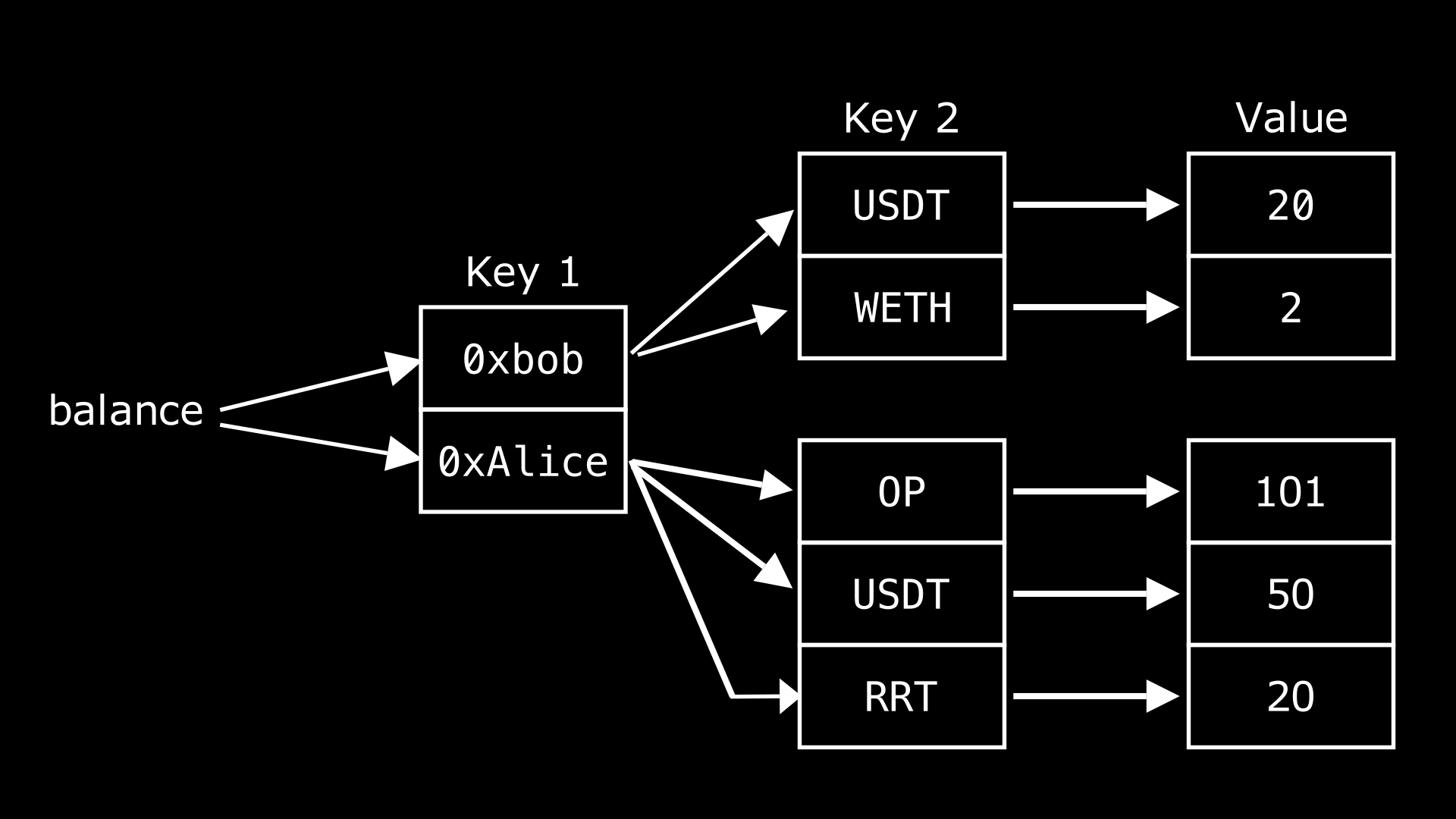
This shows that the balance variable holds two different addresses, 0xbob and 0xAlice, each of these addresses is associated with multiple tokens, which in turn map to different balances, hence, nested mappings.
Storage Slot For Nested Mappings
The calculation of storage slots for nested mappings is similar to that of single mappings, with the difference being that the “level” of mapping corresponds to the number of hash operations.
Below is an visualization that demonstrates a two-level mappings:

Example
In the code example, we init the map with a key-value address(0xb) → 1 → 1. and it has 2 functions
contract MyNestedMapping {
  mapping(address => mapping(uint256 => uint256)) public balance;

  constructor(address user, uint256 tokenId, uint256 value) {
    balance[user][tokenId] = value;
  }
}
let test it, let try to compute the storage slot and get the value manually
it("--- STORAGE LAYOUT FOR NESTED MAPPING ---", async () => {
    const userAddress = await user.getAddress();
    const tokenId = 1;
    const value = 1;

    const Contract = await ethers.getContractFactory("MyNestedMapping");
    const contract = await Contract.deploy(userAddress, tokenId, value);
    const contractAddress = await contract.getAddress();

    // Set mapping value
    const mappingSlot = 0;

    // Compute storage slot of balances[owner.address]
    const key1 = zeroPadValue(userAddress, 32);
    const key2 = zeroPadValue(toBeHex(tokenId), 32);
    const slot = zeroPadValue(toBeHex(mappingSlot), 32);

    const initHash = keccak256(concat([key1, slot]));
    const storageSlot = keccak256(concat([key2, initHash]));

    // read raw storage value
    const rawValue = await ethers.provider.getStorage(
      contractAddress,
      storageSlot,
    );

    const storedValue = toBigInt(rawValue);
    expect(storedValue).to.equal(value);
}
or compute it on solidity by those functions
getStorageSlot()function which takes in two arguments which are the keys needed to derive the desired slot.- the first is the hash of the
_key1(user) and thebalancemapping slot, which is then stored ininitialHashvariable. - the second is the hash of
_key2(tokenID) andinitialHash, to get the slot ofbalance[_key1][_key2]. If it were a 3-level mappings, the third key (_key3) would be hashed with the value from the second hash operation to get the desired storage slot and so on.
- the first is the hash of the
- The
getValuefunction which takes in a slot as argument and returns the value held in it, which behaves the same as the previous example.
contract MyNestedMapping {
	//... old code

  function getStorageSlot(
    address _key1,
    uint256 _key2
  ) public pure returns (bytes32 slot) {
    uint256 balanceMappingSlot;
    assembly {
      // 'slot' returns the state variable (balance)
      // location within the storage slots.
      // In our case, 0
      balanceMappingSlot := balance.slot
    }
    // First hash
    bytes32 initialHash = keccak256(abi.encode(_key1, balanceMappingSlot));
    // Second hash
    slot = keccak256(abi.encode(_key2, initialHash));
  }

  function getValue(bytes32 _slot) public view returns (uint256 value) {
    assembly {
      // Loads the value stored in the slot
      value := sload(_slot)
    }
  }
}
let test it:
it("--- STORAGE LAYOUT FOR NESTED MAPPING ---", async () => {
  // ... old code here

  // new one
  const slotOfOwnerBalance = await contract.getStorageSlot(
    userAddress,
    tokenId
  );

  const valueOfOwnerBalance = await contract.getValue(slotOfOwnerBalance);

  expect(valueOfOwnerBalance).to.equal(value);
});
And those 2 functions above just equal this one
contract MyNestedMapping {
	//... old code

	function getBalance(address user, uint256 tokenId)
	   public view returns (uint256)
	{
    return balance[user][tokenId];
  }
}
Array
This is a dynamic type in Solidity used to store an indexed collection of elements of the same type, either primitive or dynamic. Solidity supports two array types: fixed-size and dynamic, with different storage allocation methods.
Fixed-Size Arrays
This type of array has a predetermined size that cannot be changed after the array is declared.
Slot Allocation For Fixed-size Array
If the type of each array element occupies a storage slot capacity (256 bits, 32 bytes, or 1 word), the Solidity compiler treats these elements as individual storage variables, assigning them slots sequentially starting from the slot of the array's storage variable.
contract MyFixedUint256Array {
uint256 public num; // storage slot 0
uint256[3] public myArr = [
4, // storage slot 1
9, // storage slot 2
2 // storage slot 3
];
} Let's look at another example, similar to the previous one, but this time using
 uint32 as the data type for the array:
contract MyFixedUint32Array {
    uint256 public num; // storage slot 0

    uint32[3] public myArr = [
                                4, // storage slot ???
                                9, // storage slot ???
                                2  // storage slot ???
                            ];
}
The third element in the array might not be in slot 3. If each element doesn't
take up a full storage slot—like uint32, which is only 4 bytes—the Solidity
compiler packs multiple elements into a single slot until it's full. If there
isn't enough space left for the next element, Solidity moves to the next slot.
This works the same way as packing storage variables that don't individually
occupy a full slot.

Dynamic Arrays
Unlike fixed-size array that has its size predetermined at compile time, dynamic array can change size at runtime.
Slot Allocation For Dynamic Array
- The
base slotof dynamic array stored length of its - To get slot of first element =
keccak256(base slot)

Example of contract
contract MyDynArray {
    uint256 private num;                          // storage slot 0
    uint256[] private myArr = [3, 4, 5, 9, 7];    // storage slot 1

    function getSlotValue(uint256 _index)
       public view returns (uint256 value)
    {
        uint256 _slot = uint256(keccak256(abi.encode(1))) + _index;
        assembly {
            value := sload(_slot)
        }
    }
}
And test it
it("--- STORAGE LAYOUT FOR DYNAMIC ARRAY ---", async () => {
  const Contract = await ethers.getContractFactory("MyDynArray");
  const contract = await Contract.deploy();
  const contractAddress = await contract.getAddress();

  const slotIndex = 1; // slot base of myArr
  const slotKey = zeroPadValue(toBeHex(slotIndex), 32);

  // 🔢 1. get length of myArray
  const rawLength = await ethers.provider.getStorage(
    contractAddress,
    slotIndex
  );

  expect(rawLength).to.equal(5n);

  // 🔢 2. compute slot of the first element: keccak256(slotIndex)
  const baseSlot = keccak256(slotKey); // slot of data[0]
  const baseSlotBigInt = toBigInt(baseSlot);

  // 🔍 3. get value the first and second element
  const element0 = await ethers.provider.getStorage(
    contractAddress,
    baseSlotBigInt + 0n
  );
  const element1 = await ethers.provider.getStorage(
    contractAddress,
    baseSlotBigInt + 1n
  );
  const element2 = await contract.getSlotValue(2n);

  console.log("data[0]:", toBigInt(element0).toString()); // 3
  console.log("data[1]:", toBigInt(element1).toString()); // 4
  console.log("data[2]:", toBigInt(element2).toString()); // 5

  expect(toBigInt(element0)).to.equal(3n);
  expect(toBigInt(element1)).to.equal(4n);
  expect(toBigInt(element2)).to.equal(5n);
});
What happens when elements don't use up a storage slot space?
Let's change myArr to use uint32 instead of uint256 in MyDynArray contract:
contract MyDynArray {
    uint256 private someNumber;                   // storage slot 0
    address private someAddress;                  // storage slot 1
    uint32[] private myArr = [3, 4, 5, 9, 7];     // storage slot 2

    function getSlotValue(uint256 _index)
       public view returns (bytes32 value)
    {
        uint256 _slot = uint256(keccak256(abi.encode(2))) + _index;
        assembly {
            value := sload(_slot)
        }
    }
}
The following changes has been made:
uint256[]⇒uint32[]: the data type for the dynamic array.uint256 value⇒bytes32 value: the return value, so we can easily see how the values are packed.
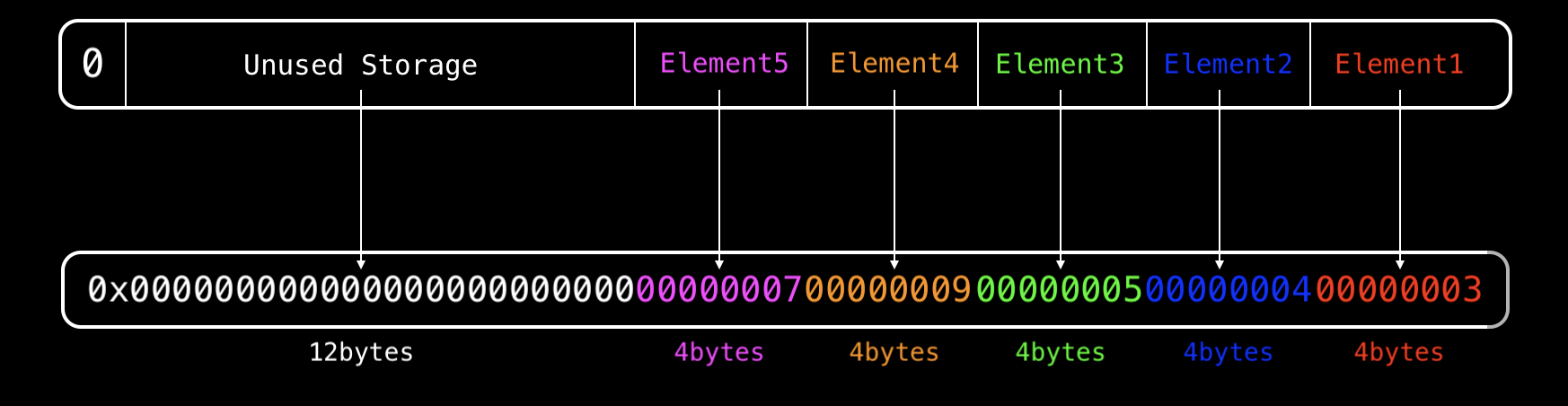
Each element occupies 4 bytes out of the available 32 bytes per storage slot. With 5 elements, the total size is . This means all the elements can fit within a single storage slot, with some space remaining.
it("--- STORAGE LAYOUT FOR DYNAMIC ARRAY ---", async () => {
  const Contract = await ethers.getContractFactory("MyDynArray");
  const contract = await Contract.deploy();
  const contractAddress = await contract.getAddress();

  const slotIndex = 1; // slot base of myArr
  const slotKey = zeroPadValue(toBeHex(slotIndex), 32);

  const data = await contract.getSlotValue(0n);
  console.log(element2.toString());
  //output = 0x0000000000000000000000000000000700000009000000050000000400000003
});
String
Strings in Solidity are dynamic types, meaning they don't have a fixed length. Some strings may fit within a single storage slot, while others may require multiple slots.
Consider the following example contract:
contract String {
    string public myString;
    uint256 public num;
}
The storage slot of the string is 0 and the storage slot of the uint256 is 1.
- If we store a short string(≤ 32 bytes) data in
myString, we can retrieve it from slot 0 without any issues. - However, if we store a longer string data, let's say one that takes up 42 bytes, it would overflow slot 0 and overwrite slot 1, which is reserved for the
numvariable initially.
This happens because slot 0 isn't large enough to contain the longer string. To prevent this issue, Solidity uses different methods for allocating storage slots for string types, depending on the string's length.
The storage variable slot (base slot) stores the string together with information about its length for short strings or only information about its length for long strings, and these cases will be studied in different sections below.
Short Strings
Short String (≤ 31 bytes):
The string data and its length are stored together in the base slot. The string is packed from the left, with its length in the rightmost byte of the slot.
Example of a short string Hello World in hex.
68656C6C6F20776F726C64is value of “hello world”zerosarefree spacethat can be used to store a longer string(up to 31 bytes).- The last byte holds the
lengthof the string.

Long Strings
Long String (> 31 bytes):
The (length of the string * 2) + 1 is stored in the base slot, then the string in hex is stored in a continuous storage slot space. The first 32 bytes of the string data are stored at the keccak256 hash of the base slot. The next 32 bytes are stored at the hash of the base slot plus one, and the next, hash plus two, and so on, until the entire string is stored.

Example
contract StorageString {
  string public shortString = "hello world";
  string public longString = "hello world, greetings from my team and i";

  bytes32 public startingSlotString = keccak256(abi.encode(1));

  function getSlotForString(uint256 _index) public view returns (bytes32) {
    return bytes32(uint256(startingSlotString) + _index);
  }
}
and test case
async function getStorage(slot: BigNumberish): Promise<string> {
  return ethers.provider.getStorage(contractAddress, BigInt(slot));
}

it("should read long string", async () => {
  const Contract = await ethers.getContractFactory("StorageString");
  const contract = await Contract.deploy();
  contractAddress = await contract.getAddress();

  const baseSlot = 1;
  // length of string
  expect(await getStorage(baseSlot)).equal(
    "0x0000000000000000000000000000000000000000000000000000000000000053"
  );

  // Read the string data from that offset
  const parts: string[] = [];

  for (let i = 0n; i < 2n; i++) {
    const slot = await contract.getSlotForString(i);
    const value = await getStorage(slot);
    parts.push(value.replace(/^0x/, ""));
  }

  // Step 4: Combine and decode
  const joined = parts.join("");
  const buffer = Buffer.from(joined, "hex");
  const str = buffer.toString("utf8").replace(/\0+$/, "");

  expect(str).to.equal("hello world, greetings from my team and i");
});
Optimized Even And Odd Check
The common method in most programming languages to check if a number is even or odd is by using the modulus operator (num % 2) and checking if the remainder is 0. This also applies in Solidity. However, a more optimized way is to use the bitwise AND operation: num & 1 == 0. Below is an example of both methods and their respective costs:
contract ModMethod {
        // Gas cost: 761
    function isEven(uint256 num) public pure returns (bool x) {
        x = (num % 2) == 0;
    }
}

contract BitwiseAndMethod {
        // Gas cost: 589
    function isEven(uint256 num) public pure returns (bool x) {
        x = (num & 1) == 0;
    }
}Related Posts
Find more posts like this one.


January 10, 2024
I'm Done Typing npm
Are you tired of typing npm?
Read more
May 29, 2025
Load balancer RPC endpoints
Did your Dapp cash because of RPC endpoint?
Read more
May 13, 2025
Solidity: Storage Slots of Primary Types
This article explains how Solidity stores smart contract data using storage slots, packing for efficiency, and Yul assembly for direct storage access
Read more
May 13, 2025
Cache Strategies
Cache strategies are a way to improve the performance of a system.
Read more
May 9, 2025
Load Balancer
A load balancer is a device that distributes network traffic between multiple servers
Read more
May 9, 2025
Rate Limiting
Rate limiting is a technique used to control the rate of requests to a service.
Read more
May 13, 2025
Redis
Redis is an open-source, in-memory data structure store used as a database, cache, and message broker.
Read more
May 19, 2025
Javascript: deep cloning object methods
Read more
May 7, 2025
Prettier merged type
Prettier merged type
Read more
January 5, 2025
Should we use type or interface in typescript
Read more